Nuki Smart Lock Installation: Step-by-Step Guide
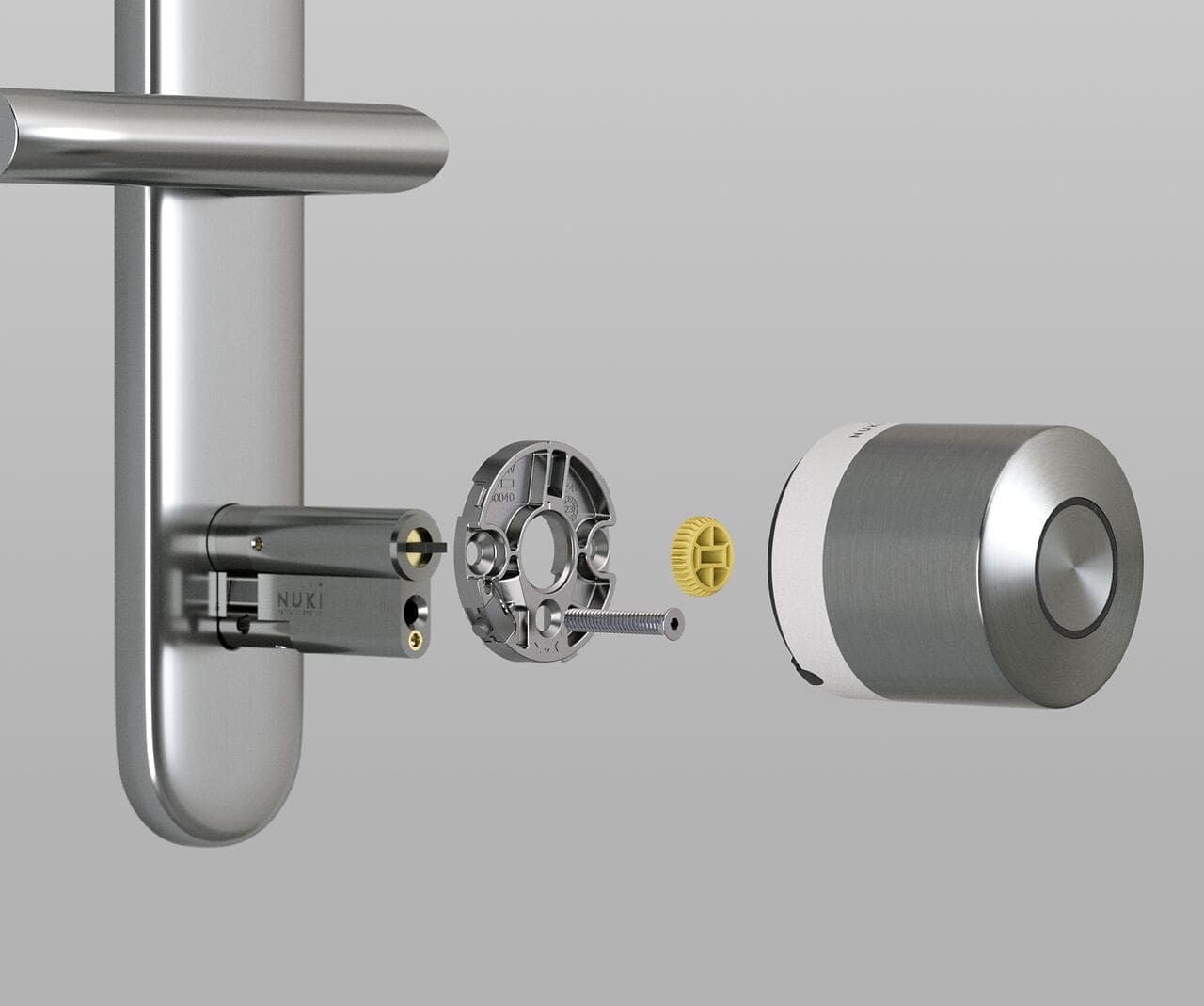
Nuki Smart Lock installation is a tool-free process that typically takes 10–15 minutes. Mount the adapter to your existing cylinder, attach the smart lock body, pair via Bluetooth in the app, and run the auto-calibration. Your existing keys continue to work throughout.
What makes Nuki installation different
No specialist required. Unlike many smart lock systems, Nuki installation involves no drilling, no wiring, and no door modification. No locksmith or electrician needed.
Reversible. If you move, remove the lock and take it with you. The door returns to its original state in minutes.
Step-by-step installation
Step 1: Choose the right mounting adapter
The Nuki box includes an adapter set. Select the one that matches your lock type:
- Type A: Standard cylinder locks (most common)
- Type B: Locks with a recessed key
- Type C: Long-body cylinder locks
- Type D: Oval-profile locks
Place the adapter over the cylinder, align it with the keyhole, and press clockwise to seat.
Step 2: Mount the base plate
The base plate holds the main unit. Position it over the adapter with the arrow facing the door handle. Adhesive mounting is recommended: peel the protective film, press for 10 seconds, and allow 1 hour for full adhesion before applying load.
Step 3: Attach the Nuki main unit
Insert 4 AA batteries with correct polarity. Place the Nuki unit at the top of the base plate and slide it down until it clicks into place. The LED will blink to confirm it is powered.
Step 4: Pair via the Nuki app
Download "Nuki Smart Lock" from the App Store or Google Play. Create an account, enable Bluetooth and location services. Tap "Add Device": the app scans for nearby Nuki devices automatically.
Select your lock from the list. Press the button on the lock for 5 seconds to enter pairing mode. When pairing completes, "Connected" appears in the app.
Step 5: Calibration and testing
Calibration teaches Nuki your lock mechanism. With the door closed, tap "Start Calibration" in the app. Nuki performs 3–4 lock and unlock movements automatically. Do not interrupt this step.
Testing: use the "Lock" and "Unlock" buttons in the app to confirm correct operation. Test with the physical key to confirm the mechanism runs smoothly both ways.
Advanced setup
Wi-Fi Bridge integration
For remote access, plug the Nuki Bridge into a socket in the same room as the lock. In the Nuki app, go to "Accessories" > "Add Bridge." When the Bridge LED blinks, select your Wi-Fi network and enter the password.
Smart home integration
Apple HomeKit: In the Nuki app, go to "Integrations" > "Apple HomeKit." Open the iOS Home app, select "Add Accessory," and scan the Nuki QR code.
Google Home: In the Google Home app, tap "Add device," search for "Nuki Smart Lock," and link your account.
Post-installation checklist
- Run at least 10 lock/unlock cycles to confirm smooth operation
- Set auto-lock timer to match your preference
- Check battery level in the app
- Verify firmware is up to date
- Configure notification settings
- Test the physical key as emergency fallback
Common issues and fixes
Lock doesn't complete the full turn: The adapter is likely the wrong type or not fully seated. Remove, recheck the lock type, and reseat the correct adapter.
Bluetooth drops during setup: Keep the phone within 2 meters of the lock during installation.
Calibration fails: Increase the force setting in the app, or lubricate the lock mechanism.
FAQ
Do I need a professional for installation? No. Installation is designed for self-service with no tools and no technical background. Average time: 10–15 minutes.
Does installation damage the existing lock? No. The retrofit system does not modify the lock mechanism. Adhesive mounting leaves no marks.
Do my existing keys still work after installation? Yes. Nuki is fully compatible with your existing physical keys. Both smart access and mechanical key work simultaneously.
Does it work without Wi-Fi? Yes. Bluetooth local control works without internet. Wi-Fi (via Bridge or built-in) is only needed for remote access.
Recommended accessories
- Nuki Bridge: Remote access via Wi-Fi, 6,390 TL
- Keypad 2: Fingerprint and PIN entry, 9,990 TL
- Door Sensor: Door state monitoring, 3,990 TL